PUBLIC BETA / STREAM DECK PLUGIN 0.3.0

Control WJ Sound Pon
from Stream Deck.

Assign A/B deck play, pause, stop, and fade-stop controls, A-deck scene changes, cue selection, and direct cue playback to Stream Deck keys with this free Public Beta plugin.

Free Plugin Apple Silicon / Intel Mac macOS 13 or Later Stream Deck 7.1 or Later
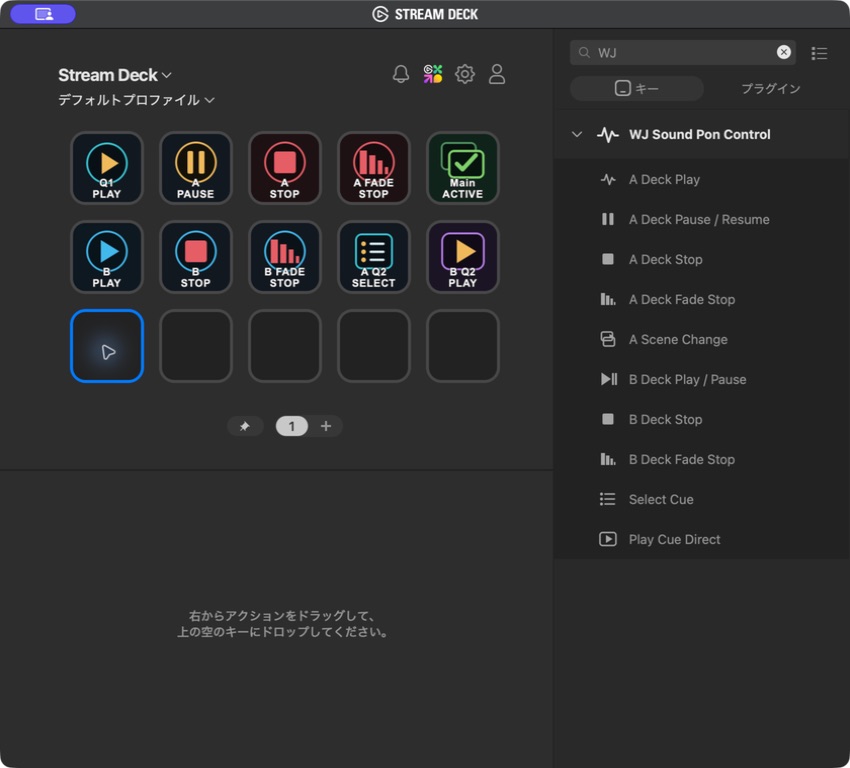
Ten WJ Sound Pon Control actions assigned to keys in the Stream Deck app

10 ACTIONS

Give each live control its own key.

Playback status, pause status, and the selected cue are reflected in each key’s color and label. Cue and A-scene targets can be configured individually for each key.

A Deck

  1. A Deck Play
    Play the selected or NEXT cue from its start
  2. A Deck Pause / Resume
    Pause or resume the current playback
  3. A Deck Stop
    Stop A Deck immediately
  4. A Deck Fade Stop
    Stop using the cue’s fade-out time
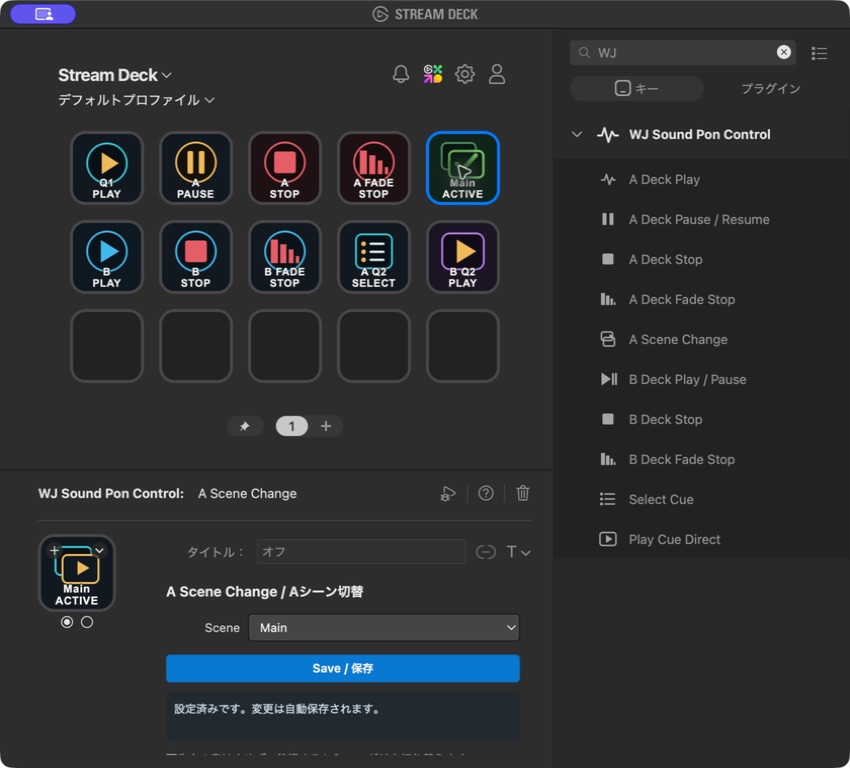
  5. A Scene Change
    Switch to a specified A-deck Scene Memory
B Deck

  1. B Deck Play / Pause
    Play, pause, or resume BGM
  2. B Deck Stop
    Stop B Deck immediately
  3. B Deck Fade Stop
    Stop using the cue’s fade-out time

Cue

  1. Select Cue
    Select a specified A/B cue without playing it
  2. Play Cue Direct
    Play a specified cue once from its start. On B Deck, even cues outside normal PLAY rotation can work like sampler pads

INSTALLATION

Install the official WJ Sound Pon app, then the plugin.

Even without your Stream Deck hardware nearby, you can arrange and configure actions in the Stream Deck desktop app. Test physical key presses after connecting your device.

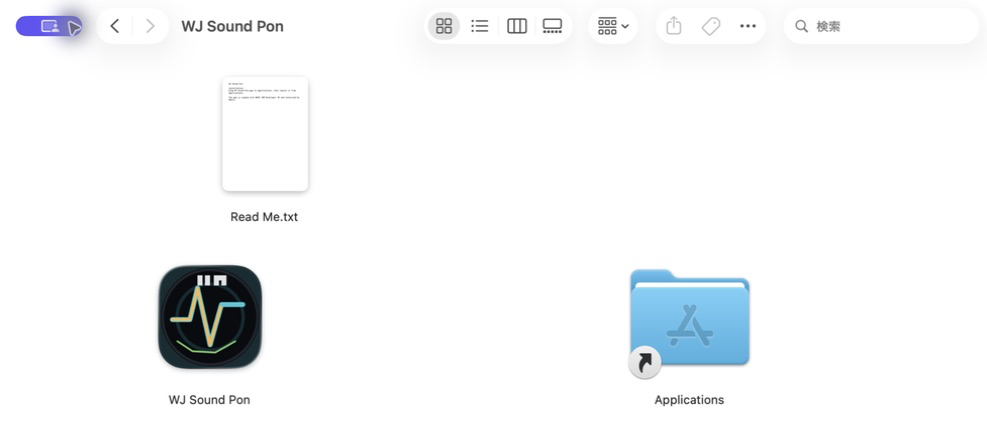
Move official WJ Sound Pon 1.2.3 to Applications

Open the Apple Silicon or Intel DMG that matches your Mac, then drag WJ Sound Pon into Applications. When updating an older version, choose Replace if macOS asks.

DMG window for installing official WJ Sound Pon 1.2.1 into Applications
Stream Deck integration requires WJ Sound Pon 1.2.1 or later.

Add Stream Deck plugin 0.3.0

Double-click the .streamDeckPlugin file and approve the installation in Stream Deck. “WJ Sound Pon Control” then appears in the action list.

Installing the WJ Sound Pon Control plugin in Stream Deck
The plugin is free and requires Stream Deck 7.1 or later.

Assign the ten actions to keys

Launch official WJ Sound Pon 1.2.3 and open a project. In Stream Deck, drag the actions you need onto keys. A key shows OPEN WJ when the app is closed and OPEN APP while it is on the launch screen.

Assigning the ten WJ Sound Pon Control actions to Stream Deck keys
Arrange A/B Deck, A Scene Change, and cue controls to fit your workflow.

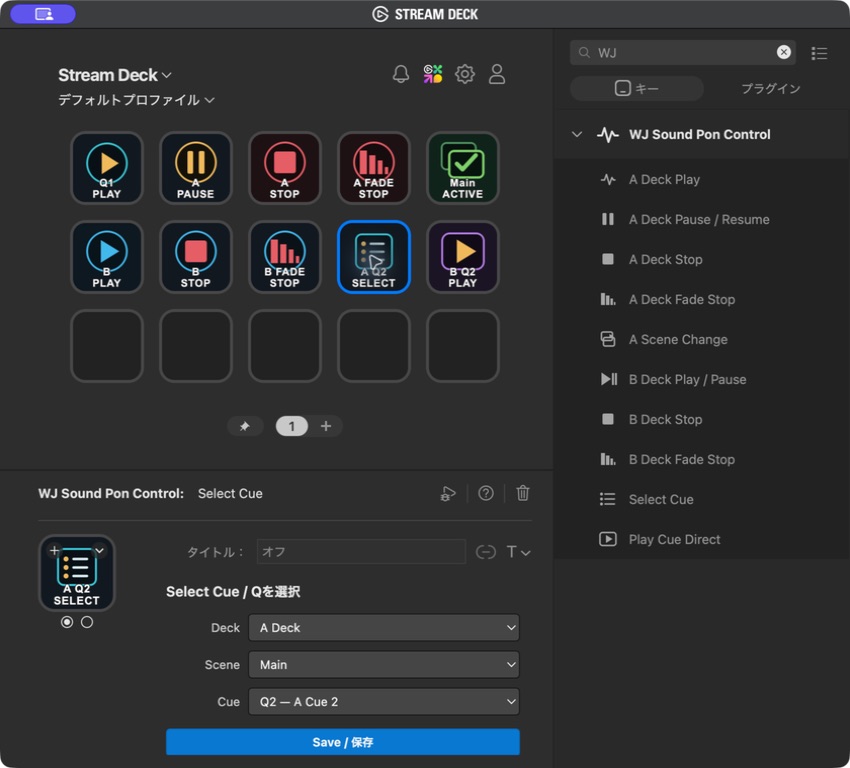
Choose a Scene and cue for each key

For A Scene Change, choose the target Scene Memory. For Select Cue and Play Cue Direct, choose the Deck, A-deck Scene, and cue. Each key’s settings are stored in its Stream Deck profile.

Choosing a Deck, Scene, and cue in Stream Deck action settings
For B Deck, the unnecessary Scene field is hidden so you can choose the cue directly.

BEFORE YOU USE THE BETA

Only the plugin is a Public Beta.

WJ Sound Pon itself is the official release

Install the latest official WJ Sound Pon 1.2.3 through the normal download route. Plugin 0.3.0 supports WJ Sound Pon 1.2.1 and later.

The free plugin is a Public Beta

Plugin 0.3.0 is free. The official WJ Sound Pon app continues to work normally without the plugin installed.

Use Stream Deck’s standard page navigation

If you need more key pages, use Stream Deck’s built-in page navigation. This plugin does not duplicate it with a dedicated Next Page action.

Long-duration hardware QA is ongoing

Action placement, saved settings, A/B controls, Scene switching, cue selection, and direct playback have been checked in the Stream Deck desktop app. Long-duration testing with physical keys is ongoing, so test thoroughly and prepare a fallback before live use.

DOWNLOAD PUBLIC BETA

Download official WJ Sound Pon 1.2.3 and the free Beta plugin.

WJ Sound Pon is an official release signed with Developer ID and notarized by Apple. The plugin is a Public Beta that passes validation with Elgato’s official CLI. If you already use WJ Sound Pon 1.2.3, you only need to add the plugin.

Stream Deck and Elgato are trademarks of their respective owners. This Public Beta is independently provided by WAVE JAM.